
The best test is a real booking that changes. This guide gives you a booking checklist, a flight delay test and questions for a vendor demo. Hoppvia publishes it and sells booking software. The checklist lists things to test, not features every Hoppvia plan includes.
What software do airport transfer companies use to manage bookings?
Start by writing down who handles each step today. A booking form on its own may take a reservation without telling dispatch whether a driver accepted it. A driver app may show a trip but miss a later pickup change. Ask each supplier to show how the steps connect, even when one vendor supplies all of them.
| Area | What to check in a demo | Question to answer |
|---|---|---|
| Bookings | Pickup details, dates, passenger needs and confirmation | Does it handle the services and booking channels you sell? |
| Dispatch | Free drivers, offers, acceptance and reassignment | Who acts if no driver accepts? |
| Driver app | Job details, pickup notes and trip status | Does the driver see changes, and confirm them? |
| Passenger messages | Confirmation, driver details and pickup changes | Which channels are set up, and who pays for them? |
| Payments and records | Fare, payment status and trip history | Can staff find a finished or cancelled booking without typing it again? |
If you run shared shuttles, add seats, stops and route planning to the demo. Software built for private cars does not always handle shared seats.
Capture what the driver needs for pickup
Bring a real example with names removed. Ask the supplier to create the booking through the channel you use, then show the same details in the dispatch and driver views.
- Pickup and destination, with the date, local time and time zone clear.
- Flight number and travel date, when the flight affects the pickup.
- Airport, terminal and meeting point, with pickup notes.
- Passenger contact details, and who should get updates.
- Number of passengers, luggage and any vehicle or assistance needs.
- Fare, waiting time policy, payment status and cancellation terms.
- Booking reference, driver status and a record of later changes.
Test the fields that matter to your service. A note typed by a passenger is not the same as a rule that checks vehicle size, or a confirmed special request.
Flight data is not the same as automatic dispatch
Ask about three separate things: saving a flight number, getting flight status updates, and changing the pickup when the flight changes. A supplier may offer one without the others.
For example, FlightAware AeroAPI offers flight data and alerts. That shows what the data service can do. It does not mean a booking platform has connected it, or that a delay will move a driver automatically. Confirm the provider, coverage, account owner, cost and what happens when data is missing or late.
Decide which changes your staff must approve. A late flight can clash with the driver's next job, the passenger's free waiting time and the agreed fare. Ask how the system shows those clashes and who sorts them out. Set the pickup buffer for each airport and service, rather than one fixed delay after landing.
Run a flight delay and no-show test
Use this as a sample test. It is not a report from a live customer or a claim that Hoppvia automates these steps today.
| Test | Ask the supplier to show | Note before you buy |
|---|---|---|
| Normal pickup | Create a booking, offer it to a driver and show acceptance | The same reference, pickup details and status in every view |
| Flight lands 90 minutes late | Update the flight and review the pickup change | Is it manual or automatic? Who approves it? Who is told? |
| Driver has another booking | Spot the clash and pick another driver | What staff can change and how the new driver accepts |
| Passenger changes terminal | Change the meeting point after assignment | How the driver gets the new details, and where the change is saved |
| Driver declines or doesn't reply | Leave the trip unassigned and show the next step | Who handles it and how the passenger is updated |
| Passenger doesn't show up | Follow your contact, waiting and no-show steps | Who approves a charge or cancellation, and what record is kept |
| Flight data stops working | Show missing or old data | The warning staff see, the backup process and who owns it |
Mark each test as shown, needs setup, needs custom work or not available. Add open items to the proposal. A screenshot of a perfect pickup can't answer these questions.
What can you see in Hoppvia today?
Hoppvia's airport transfer software page explains its booking and driver flows and what to agree for an airport launch. The dispatch walkthrough shows free drivers and how a dispatcher offers a job. The driver must accept before the trip is assigned.
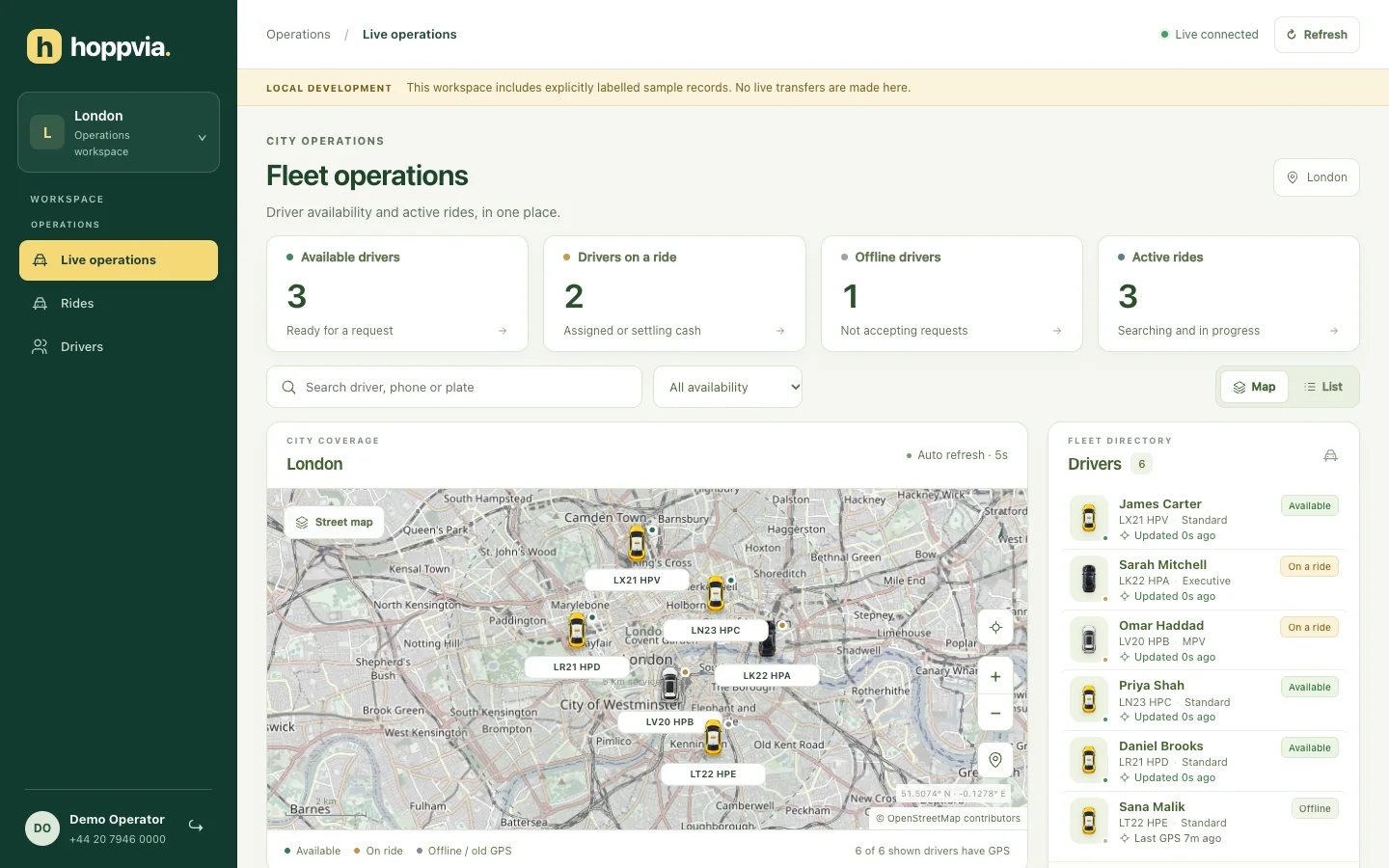
This screenshot uses sample drivers, places and rides. It shows the dispatch panel, not a live airport fleet, a flight data connection or automatic rescheduling. Follow the customer and driver walkthrough to see the other sides of a sample booking. Then ask to see your own airport trip in every view.
Scheduled and airport bookings come with the Growth plan at $3,990 a year. Live GPS tracking and card payments are in every plan. Flight data integration is available on Enterprise. Hosting and updates are always included, and you pay outside providers directly.
Check connected services and who does what
For each service, note the provider, what it does, who owns the account, the setup work, the running cost and who fixes it if it fails.
Payments: test the fare, payment confirmation and cancellation flows you need. A payment provider's features don't prove the booking system uses them. For example, Stripe Checkout documentation describes hosted payment pages. Each booking system still has to connect it. Check company invoicing and partner payments separately from card payments.
Passenger updates and location: check the real message channels, what happens when a location goes stale and how staff reach the passenger if a message fails.
Hotel and travel partner bookings: if these matter to you, test a booking, a change and a cancellation from the partner you actually use. Agree how references, passenger details, status updates and duplicates are handled. "API access" is not proof of a working partner connection.
Build a twelve-month cost comparison
Ask each vendor to price the same fleet, trip volume, channels and launch scope. Keep one-time costs separate from monthly and usage costs. This worksheet is not Hoppvia's price list. See the Hoppvia pricing page for published plans.
| Cost | What to include |
|---|---|
| Licence and setup | Software, branding, setup, data migration and training |
| Integration work | Flight data, payments, messaging and partner connections |
| Running costs | Hosting, subscription, maintenance and support |
| Usage fees | Expected bookings, messages, maps, flight data and payments at each provider's rates |
| Other costs | App store accounts, taxes and work outside the quote |
For a steady workload, add one-time costs + twelve months of running costs + expected usage fees. If your volume changes a lot, work out each month separately, including minimum charges and tier changes. Keep any estimated staff time savings separate from the vendor price.
Use the taxi software cost guide to prepare questions. No fleet-size rule or standard timeline replaces a written proposal and a real test.
Questions to ask your supplier
- Can we follow one airport booking through the customer, dispatch and driver views?
- Which booking rules and airport fields are included at launch?
- Does flight data only show on screen, or does it change the job? Who approves changes?
- What happens after an unanswered offer, a late flight, a terminal change or a no-show?
- Which services are connected at launch, and who owns the accounts and pays the fees?
- Can staff find the trip history, payment status and changes after the trip?
- What data can we export, and what happens to our apps and accounts if we leave?
- What must pass before launch, and who supports each connected service?
Bring your answers to a Hoppvia airport transfer demo. Share your airports, booking channels, fleet size, one normal pickup and one disrupted trip. Ask for a written launch plan that shows what will be shown, set up and delivered.
Frequently asked questions
Does airport transfer software need automatic flight tracking?
It depends on how many airport trips you run and how your team works. Saving flight details, getting updates and acting on them are different things. If you need automatic flight handling, test it with delays, missing data and driver clashes before you buy.
Can Hoppvia handle advance airport bookings and flight updates?
Yes for advance airport bookings, which come with the Growth plan. Flight data integration is available on the Enterprise plan as custom work. The sample screens alone don't show a connected flight tracking service.
How much does airport transfer booking software cost?
Compare the same setup, trip volume and support across suppliers. Include one-time setup, yearly or monthly software and hosting, and outside usage fees. Hoppvia's Growth plan, which includes airport bookings, is $3,990 a year plus a $499 setup fee. See Hoppvia pricing.
Sources and method
Written on 2 November 2026 and updated on 10 November 2026, using Hoppvia's airport page, dispatch previews and product walkthrough, plus FlightAware's AeroAPI and Stripe's Checkout pages linked above. Outside providers are mentioned to explain service types. They do not mean Hoppvia has a partnership or a finished integration with them. The demo tests are our own buying checklist, not an independent product test. Check the current product and provider terms before you buy.
